BlueAT Network - Server maintenance Update
 ‌​‍‎‏ ‌​‍‎‏ ‌​‍‎‏ ‌​‍‎‏ ‌​‍‎‏ ‌​‍‎‏ ‌​‍‎‏ ‌​‍‎‏ ‌​‍‎‏ ‌​‍‎‏ ‌​‍‎‏ ‌​‍‎‏ ‌​‍‎‏ ‌​‍‎‏ ‌​‍‎‏ ‌​‍‎‏ ‌​‍‎‏ ‌​‍‎‏ ‌​‍‎‏ ‌​‍‎‏ ‌​‍‎‏ ‌​‍‎‏ ‌​‍‎‏ ‌​‍‎‏ ‌​‍‎‏ ‌​‍‎‏ ‌​‍‎‏ ‌​‍‎‏ ‌​‍‎‏ ‌​‍‎‏ ‌​‍‎‏ ‌​‍‎‏ ‌​‍‎‏ ‌​‍‎‏ ‌​‍‎‏ ‌​‍‎‏ ‌​‍‎‏ ‌​‍‎‏ ‌​‍‎‏ ‌​‍‎‏ ‌​‍‎‏ ‌​‍‎‏ ‌​‍‎‏ ‌​‍‎‏ ‌​‍‎‏ ‌​‍‎‏ ‌​‍‎‏ ‌​‍‎‏ ‌​‍‎‏ ‌​‍‎‏ ‌​‍‎‏ ‌​‍‎‏ ‌​‍‎‏ ‌​‍‎‏ ‌​‍‎‏ ‌​‍‎‏ ‌​‍‎‏ ‌​‍‎‏ ‌​‍‎‏ ‌​‍‎‏ ‌​‍‎‏ ‌​‍‎‏ ‌​‍‎‏ ‌​‍‎‏ ‌​‍‎‏ ‌​‍‎‏ ‌​‍‎‏ ‌​‍‎‏ ‌​‍‎‏ ‌​‍‎‏ ‌​‍‎‏ ‌​‍‎‏ ‌​‍‎‏ ‌​‍‎‏ ‌​‍‎‏ ‌​‍‎‏ ‌​‍‎‏ ‌​‍‎‏ ‌​‍‎‏ ‌​‍‎‏ ‌​‍‎‏ ‌​‍‎‏ ‌​‍‎‏ ‌​‍‎‏ ‌​‍‎‏ ‌​‍‎‏ ‌​‍‎‏ ‌​‍‎‏ ‌​‍‎‏ ‌​‍‎‏ ‌​‍‎‏ ‌​‍‎‏ ‌​‍‎‏ ‌​‍‎‏ ‌​‍‎‏ ‌​‍‎‏ ‌​‍‎‏ ‌​‍‎‏ ‌​‍‎‏ ‌​‍‎‏ ‌​‍‎‏ ‌​‍‎‏ ‌​‍‎‏ ‌​‍‎‏ ‌​‍‎‏ ‌​‍‎‏ ‌​‍‎‏ ‌​‍‎‏

We have changed our PDS_HOSTNAME from rose.madebydanny.uk to blueat.network.

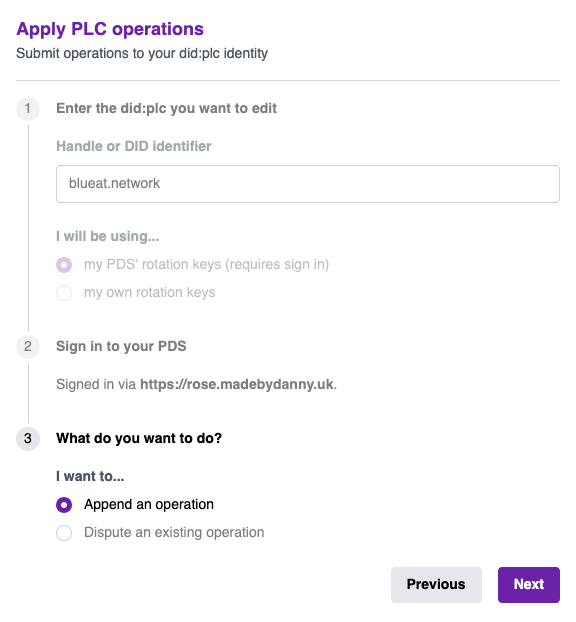
We ask all users to update their PLC document. Please use a tool like https://boat.kelinci.net/plc-applicator and sign in with your account, and change the "endpoint" in "services" from rose.madebydanny.uk to "blueat.network".
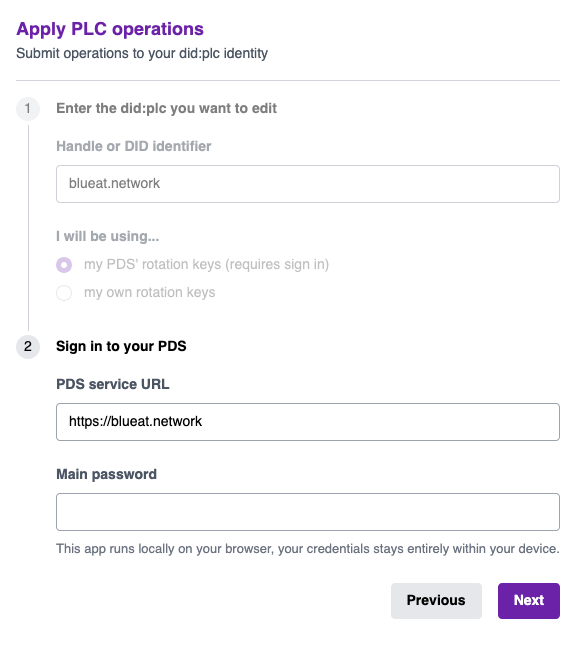
Please follow these instructions:

1. Sign in.

A screenshot of the "Apply PLC operations" page, showing fields for entering a DID identifier, signing into a PDS, and selecting rotation key options
  1. Sign in and check "Append an operation".

    Screenshot of the "Apply PLC operations" page with fields for DID identifier, PDS sign-in, and operation type.
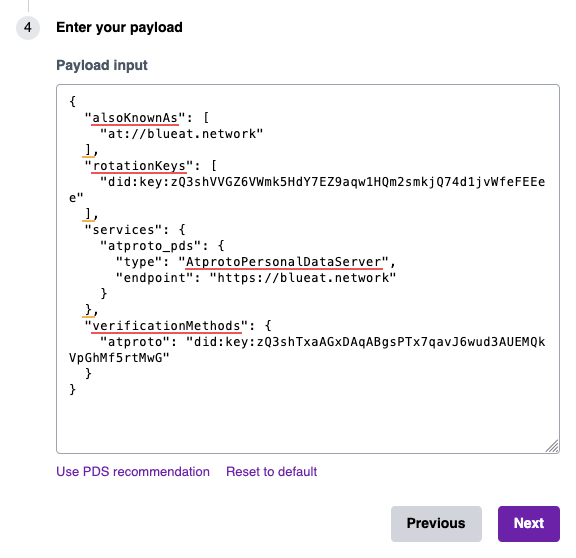
  2. Click on "Use PDS Reomcommendations", then next.

    A JSON object showing the payload input for a personal data server with fields for alsoKnownAs, rotationKeys, services, and verificationMethods.
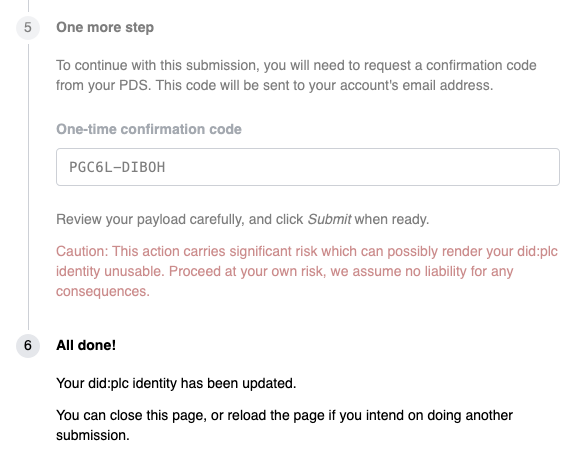
    1. Sign the PLC Operation.

      A confirmation code is displayed for a one-time submission.

    Now when you log into the Bluesky app set your service endpoint to blueat.network